

Schedule
The Schedule shows each day’s workouts: Planned, Done, or Missed when a past day’s routine was never started. Swipe between days, or tap the date to open the whole month.
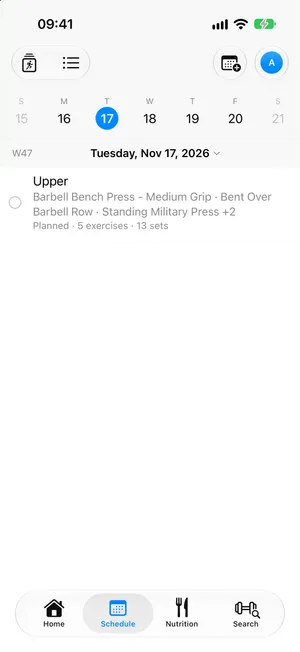
android/schedulePlanning
Section titled “Planning”- Plan a Routine Here puts any routine on the day you’re looking at.
- Move to Another Date… shifts any day not yet started, a repeating routine’s included; it shows Moved from … on its new day, and its old date stays empty. Remove from This Date takes it off: the routine’s timeline keeps the day as Removed, and Plan Again puts it back. A routine’s repeat rule is never touched by either.
- An empty day offers Create a Routine.
Changing one day
Section titled “Changing one day”Edit… in a day’s menu opens its exercises. Nothing is saved until Save, which stays off until something changed; Cancel leaves the day as it was. The name and repeat days are greyed: they change from the routine itself. Saving asks Save the Changes For:
- This Day Only: that day shows Changed for This Day, the routine and its other days are untouched. Reset to Routine drops the change, Do It Now trains it today.
- This and Following Days: from that day on, every day trains the change; the days before keep the routine as it was.
- The Whole Routine: the routine itself takes the change, every day follows it.
Edit Routine on a routine changed from a day on asks what those days do: Keep Their Changes, or follow the routine with Apply to Every Day.
Every workout as a list
Section titled “Every workout as a list”Show as List in the toolbar turns the day pages into one endless list, day by day, past and future: each routine’s days, the workouts you did without one, and other apps’ from Apple Health. Today brings you back.
Search it by a workout’s name or by an exercise it holds, in any language. The chips narrow it by Status (done, planned, missed), by kind of training, by muscle worked or by equipment.
Workouts of the past
Section titled “Workouts of the past”Log a Past Workout… records a session you trained without the app, on any past date and time; every set starts done as planned, then correct what differed. Log and Add Another Day catches up on a whole week in one go.
A workout’s page lists every set with what you did against what was planned, its active and total time, volume lifted and calories. Fix a set after the fact (Mark as Done, Mark as Skipped, or change its values), Edit Planned Workout, or Export as PDF.
ios/workout-pageandroid/workout-pageDo It Now trains another day’s routine today.